微信订阅消息的开发
分成以下几个步骤
- 微信后台订阅消息模板选择或自定义
- 前端授权
- 后端接口收到授权通知
- 业务功能,发送订阅消息
- 授权有效期检测?
1、微信后台订阅消息模板选择或自定义
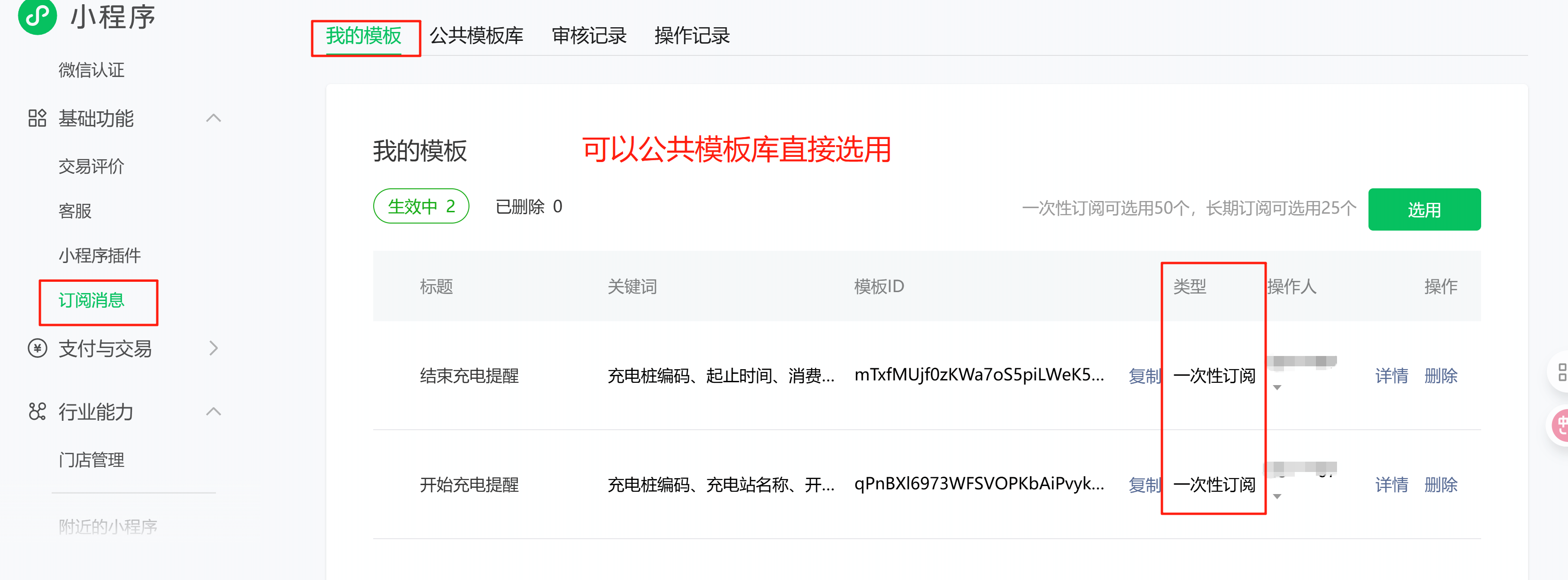
类型有“一次性订阅” 和 “长期订阅”两种,区别是
| 区别项 | 一次性订阅 | 长期订阅 |
|---|---|---|
| 消息发送次数 | 用户订阅一次,服务号可不限时间地下发一条对应的订阅通知,即用户同意一次,发一次消息。 | 用户订阅一次,服务号可长期多次下发通知。 |
| 触发条件 | 每次发送消息都需要用户单独授权。 | 用户只需首次访问时授权一次,后续满足条件即可持续触发消息发送,无需再重复询问用户。 |
| 有效期 | 通常没有明确的有效期限制,但每次授权仅对应一条消息的发送。 | 直到用户主动取消授权,否则服务号可一直下发消息。 |
| 用户体验 | 每次接收消息都需要授权,相对比较繁琐。 | 用户只需授权一次,后续能持续收到消息,体验更好。 |
| 应用场景 | 常用于单次事件的通知,如订单状态更新、活动提醒、预约提醒等。 | 适用于需要持续和多次通知的场景,如医疗健康类的定期检查提醒、政务民生类的政策更新通知等,不过长期订阅通知仅向特定的公共服务领域开放。 |
注意:长期订阅仅对医疗、政务、交通等公共服务领域开放(如医院定期体检提醒、政府政策更新),普通充电服务不在其开放范围内,无法申请;且长期订阅的 “持续多次下发” 特性,与你 “按单次充电事件触发” 的需求无关,反而可能导致权限冗余。
2、前端授权,并通知服务端
// 示例:在按钮的 bindtap 事件处理函数中 async onSubscribeMessage() { // 1. 准备模板ID数组(从公众平台后台获取,替换成你自己的) const tmplIds = [ 'qPnBXl695E', // 例如:'A1B2C3D4E5F6G7H8I9J0K1L2M3N4O5P6' 'mTxfMUjf0zKWaGTVtx4' ];
// 2. 调用 API 弹出订阅消息授权弹窗 wx.requestSubscribeMessage({ tmplIds: tmplIds, // 需要订阅的消息模板的id的集合 success: (res) => { /* res 格式: { 'Your_Template_ID_1': 'accept', // 'accept'表示用户同意订阅 'Your_Template_ID_2': 'reject' // 'reject'表示用户拒绝订阅 } */ console.log('订阅结果', res);
// 3. 处理授权结果 if (res[tmplIds[0]] === 'accept') { wx.showToast({ title: '订阅成功' }); // 这里通常会将本次订阅成功的凭证(以及用户选择)发送到后端服务器保存 wx.request({ url: 'http://localhost:48080/app-api/wx/subscribe', method: 'POST', data: { templateId: tmplIds[0], subscribeStatus: 'accept' } }) } else { wx.showToast({ title: '您拒绝了订阅', icon: 'none' }); } }, fail: (err) => { console.error('订阅接口调用失败', err); wx.showToast({ title: '订阅失败', icon: 'none' }); } }) },
3、后端接口收到授权通知
@PostMapping("/miniapp/subscribe")public voidsubscribe(@RequestBodyAppSubscribeMsgVO reqVO) {System.out.println("------------------------");System.out.println(JsonUtils.toJsonPrettyString(reqVO));}
4、业务功能,发送订阅消息
@PostMapping("/miniapp/sendmsg")
public void sendmsg(@RequestBody AppSendMsgVO reqVO) {

    Map<String, Object> data = new HashMap<>();
    data.put("character_string6", MapUtil.of("value", "867339072445426"));
    data.put("thing5", MapUtil.of("value", "南山小区雨棚"));
    data.put("time2", MapUtil.of("value", "2025-08-20 19:00"));
    data.put("amount9", MapUtil.of("value", "99.99元"));
    data.put("phrase20", MapUtil.of("value", "开始充电"));

    wechatSubscribeServiceWebClient.sendSubscribeMessage(
            weiXinService.getAccessToken(),
            reqVO.getOpenid(),
            reqVO.getTemplateId(), null, data)
            .subscribe(response -> {
                log.info("发送成功:{}", response);
                System.out.println("【最终结果】: " + response);
            }, error -> {
                log.info("最终错误:{}", error.getMessage());
                System.err.println("【最终错误】: " + error.getMessage());
            });

    // 这行代码会立即执行,不会等待微信的响应
    System.out.println("发送请求已触发,等待响应中...");
}
public Mono<String> sendSubscribeMessage(String accessToken, String userOpenId, String templateId, String page, Map<String, Object> templateData) {

//        String accessToken = "your_cached_access_token"; // 替换为你的Token获取逻辑

        // 构建请求体Map
        Map<String, Object> requestBody = new HashMap<>();
        requestBody.put("touser", userOpenId);
        requestBody.put("template_id", templateId);
        requestBody.put("page", page);
        requestBody.put("data", templateData);


        // 1. 打印请求日志(非常重要!)
        System.out.println("【发送订阅消息请求】");
        System.out.println("URL: https://api.weixin.qq.com/cgi-bin/message/subscribe/send?access_token=" + accessToken);
        System.out.println("Request Body: " + JsonUtils.toJsonPrettyString(requestBody)); // 需要import com.fasterxml.jackson.databind.ObjectMapper;


        return webClient.post()
                .uri(uriBuilder -> uriBuilder
                        .path("/cgi-bin/message/subscribe/send")
                        .queryParam("access_token", accessToken)
                        .build())
                .contentType(MediaType.APPLICATION_JSON)
                .bodyValue(requestBody)
                .retrieve()
                .bodyToMono(String.class) // 直接获取响应字符串
                .map(response -> {
                    // 2. 打印响应日志(非常重要!)
                    System.out.println("【微信服务器响应】");
                    System.out.println("-----------Response: " + response);
                    return response;
                })
                .onErrorResume(e -> {
                    // 错误处理
                    System.err.println("【网络请求失败】");
                    System.err.println("Error: " + e.getMessage());
                    e.printStackTrace();
                    return Mono.just("{\"errcode\": -1, \"errmsg\": \"Network Error: " + e.getMessage() + "\"}");
                });
    }
官方文档: https://developers.weixin.qq.com/miniprogram/dev/framework/open-ability/subscribe-message.html#%E8%AE%A2%E9%98%85%E6%B6%88%E6%81%AF%E8%AF%AD%E9%9F%B3%E6%8F%90%E9%86%92
全部评论